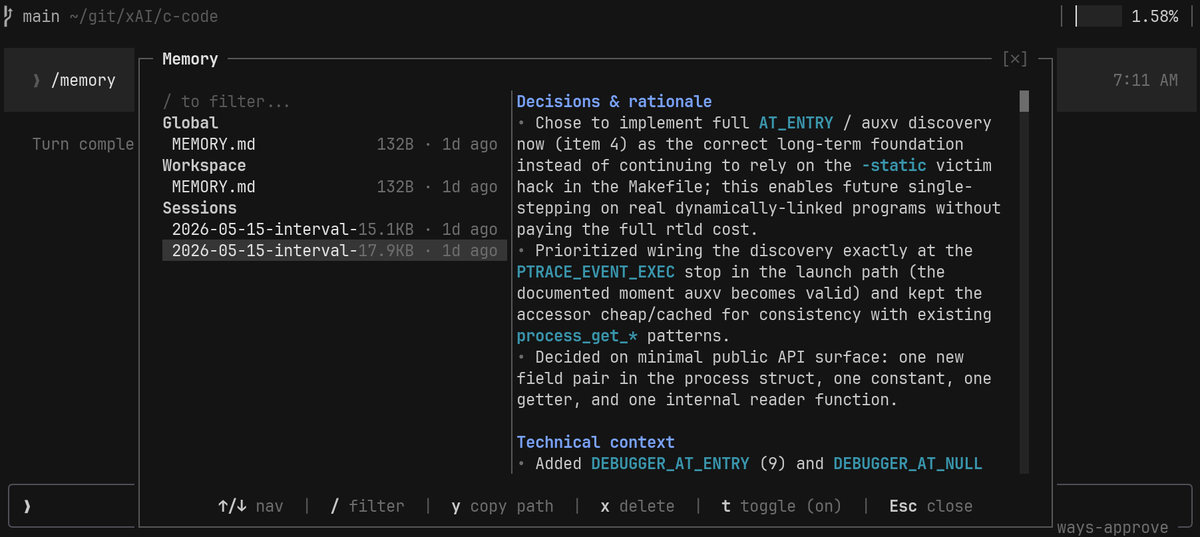
Grok Build has three commands for managing memory across sessions: /memory, /flush, and /dream. They're experimental but worth looking at if you've ever been frustrated with how agents forget everything between conversations.
/memory opens a window into what Grok has saved. There are three layers: global memory, workspace-specific memory, and per-session summaries. You can read what's there, edit it, or delete things you don't want kept.
/flush is for when you've had a useful session and want it saved before context compaction kicks in. It writes a summary of the current conversation into the memory store, capturing decisions, debugging paths, project conventions, and anything else worth keeping.
/dream runs in the background over your old session logs and memory fragments. It deduplicates overlapping notes, merges related fragments, and consolidates everything into cleaner topics, so the store doesn't grow into a pile of half redundant snippets over time.
Most agent memory I've looked at just shoves the chat history into RAG. That works for about a week before the store gets noisy and starts hurting sessions. Grok Build treats capture and consolidation as separate commands, with the user able to inspect what's saved.
The editable part is important. If your agent saves something wrong, or if your conventions change, you need to be able to go find that memory and remove it. Otherwise the agent keeps applying outdated context with full confidence and you spend cycles undoing its mistakes.
Managing context for long-running agents is going to need real memory primitives. Write, search, prune, and consolidate, all as first class operations. Grok shipping these three commands is the first time I've seen a consumer product treat memory as its own layer.