
Gemini desktop app overrides disabled open at login setting
Google's Gemini desktop app installs a background helper launcher during setup that automatically re-enables the Open at Login setting after users disable it. The override occurs without consent and persists across restarts even when changed in app settings. Users reported immediate reactivation on login. Ben Thompson called it one of the most direct overrides of user controls he has seen and plans to remove Gemini permanently. Josh Woodward said he would investigate.
 #645Ben Thompson@BENTHOMPSON
If you disable "Open at Login" for the GeminiAppLauncher" that the Gemini app installs in the background (without asking), GeminiAppLaunch will immediately re-enable "Open at Login".
I will now, needless to say, delete the Gemini app, and don't intend to ever install it again.
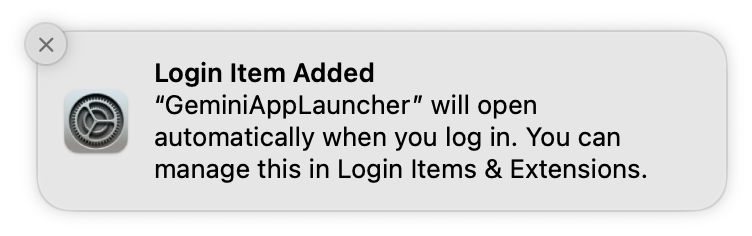
I'm actually struggling to remember a bigger middle finger to a user from an app...ever? It's bad enough to install a helper app. But to immediately undo the user's explicit setting change? Incredible.
Ben Thompson@benthompsonIf you disable "Open at Login" for the GeminiAppLauncher" that the Gemini app installs in the background (without asking), GeminiAppLaunch will immediately re-enable "Open at Login". I will now, needless to say, delete the Gemini app, and don't intend to ever install it again.
#645Ben Thompson@BENTHOMPSONFYI
 Josh Woodward@joshwoodward
Update: This is a bug. It will be fixed in the next release, aiming for right after Google IO. More info if you're interested: We ship this "helper app" (GeminiAppLauncher) to enable hotkeys so you can activate Gemini without the full app having to run all the time in the background. This helper app was never intended to ignore your explicit OS setting change. That is the bug that's being fixed. In the meantime, you can override this by turning off the "Open at Login" setting in the Gemini app settings - see the screenshot. One note: if you do this, it will turn off the background process that detects hotkeys, so global keyboard shortcuts won't work. Hope this helps, and sorry again for the frustration. A lot of us on the team, including me, love to read your stuff, and I hope you try Gemini again on your Mac.
@benthompson Odd, checking…
Ben Thompson@benthompsonIf you disable "Open at Login" for the GeminiAppLauncher" that the Gemini app installs in the background (without asking), GeminiAppLaunch will immediately re-enable "Open at Login". I will now, needless to say, delete the Gemini app, and don't intend to ever install it again.
Update: This is a bug. It will be fixed in the next release, aiming for right after Google IO.
More info if you're interested:
We ship this "helper app" (GeminiAppLauncher) to enable hotkeys so you can activate Gemini without the full app having to run all the time in the background.
This helper app was never intended to ignore your explicit OS setting change. That is the bug that's being fixed.
In the meantime, you can override this by turning off the "Open at Login" setting in the Gemini app settings - see the screenshot.
One note: if you do this, it will turn off the background process that detects hotkeys, so global keyboard shortcuts won't work.
Hope this helps, and sorry again for the frustration. A lot of us on the team, including me, love to read your stuff, and I hope you try Gemini again on your Mac.
 Josh Woodward@joshwoodward
@benthompson Odd, checking…